Home screen - dashboard
The Dashboard is a one stop page for the users to navigate to different tabs. It will have links to User schedules, Join Classes, View & Buy Offers/Campaigns, Buy Memberships, View upcoming classes and a left menu that further includes User Profile, Feedbacks, Explore clubs, Our trainers, Purchase History, About and Logout.
- Click on the sidebar on the left corner
- Click on the Home option
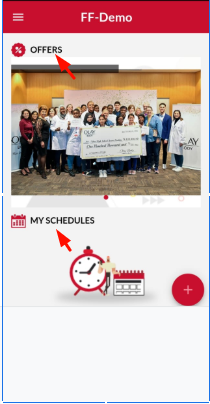
- Click on the Offer option to view the running offer’s list of the logged-in center.
- View your scheduled Classes, PT Session or any other session-based scheduled activitie
- View the scheduled upcoming class of the logged-in center.
FAQ’s
1. Can I schedule or cancel any session from the Dashboard?
Ans: Yes, you can cancel or schedule your session as per your requirement. However, there will be more steps to follow to perform these activities.